Redaction for confidential documents.
Select a name, a logo or an image once – every copy gets deleted, at any size or colour, even inside a scanned document. CIMs, board decks, contracts, diligence packs, discovery productions, FOIA releases, and de-identified medical records – in under a minute.
Drop a document here
PDF, PNG, JPEG or plain text – or browse
or a saved draft, to carry on where you left off
Key features
-
Nothing is uploaded
No server, no account, no analytics. The document is opened, read and rewritten inside this tab. No LLM is used. Close it and nothing remains.
-
Text, logos and pictures
Type any word and every occurrence is redacted, even if the word is an image and not in text format. Pick out a logo, signature, or image and every other copy is redacted, regardless of size or colour.
-
Placeholders, not blanks
Optionally label each redaction
[P1],[E2], so a later reader – or a model – can still follow the sentence. The same thing always gets the same label. -
A full set of PDF tools
Merge files, pull pages out, turn them, add text, draw on the page. Save a draft and pick the work up later. Works on a phone as well as a desktop.
Top use cases
-
Before it goes to an AI. Take the names and logos out, then paste the file into any model. The numbers and the argument survive; the party does not.
-
Deal materials. CIMs, board decks, diligence packs. Cover the target once and every copy goes, down to the badge in a chart on page 63.
-
Legal agreements. Counterparties, prices and signatures out. The clauses stay readable, so the precedent can be shared without the deal.
-
Discovery and FOIA. Covered text is gone from the file, not hidden under a rectangle somebody can select through. Each bar says what it removed.
-
Medical records. Names, dates, record numbers and hospital marks off a chart before it is used for research, teaching or a second opinion.
A real deck, redacted
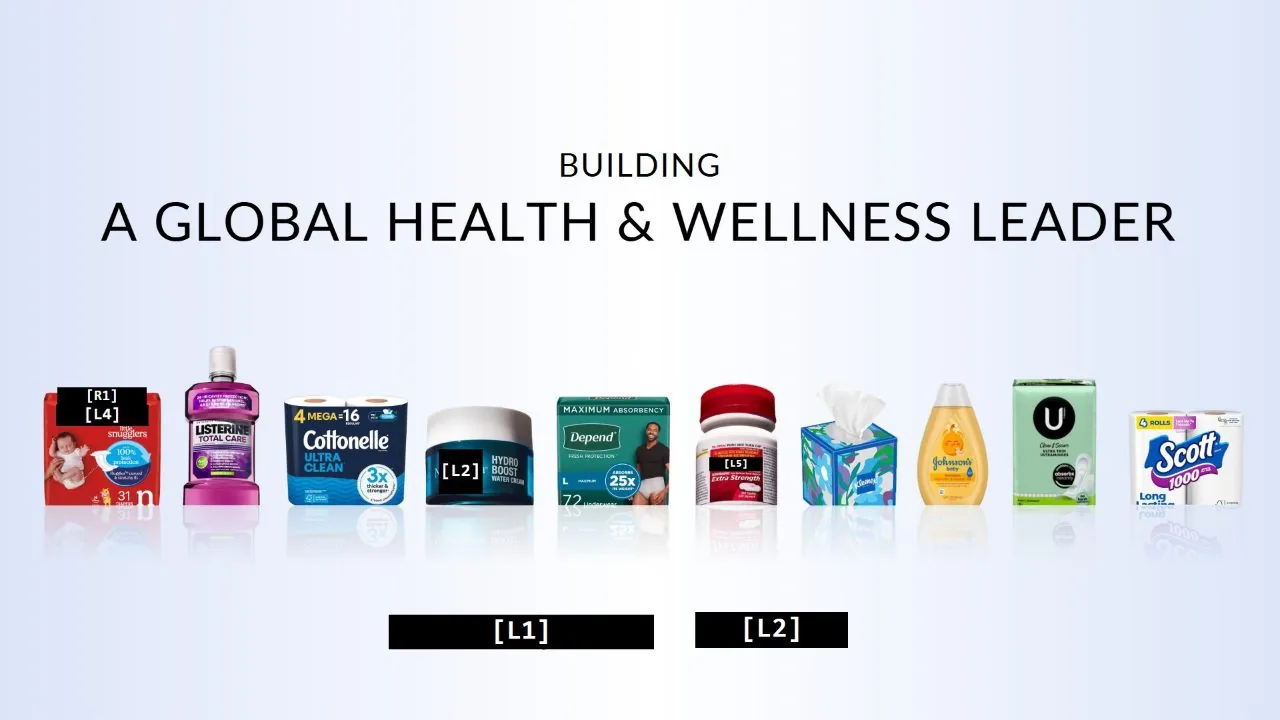
This is Kimberly Clark's investor presentation on their acquisition of Kenvue. Blinded is able to redact the two companies’ logos and names, specific key brands, people's names across the deck, in small print and inside the artwork, while the figures, the charts and the rival brands are left readable. Each redaction is labelled, so the sentence around it still reads coherently, with the private key file only accessible by you.
How Blinded compares
Blinded is the only redaction tool that never takes the file to the cloud, never uses a model, and still automatically finds repeated text, logos and images by sight and removes them completely.
| What is being compared | Blinded | Acrobat Pro | Redactable | KeptPDF |
|---|---|---|---|---|
| Where the file goes | Stays in this tab. Works offline. | Desktop, yes. The web version uploads. | Their cloud. | On device, then a login. |
| What a bar removes | Everything. The page is rebuilt from pixels. | Nothing, until you Apply and Sanitize. | Everything, on their servers. | Everything. Flattened. |
| Logos, stamps, faces | Pick one; every copy goes, any size or colour. | Draw a box. Every time. | Found for you – in the cloud. | Text only. A face still needs you. |
| Names, and words in a picture | Type it once. Caught in the text and the artwork. | Find, one spelling at a time. | Matched in the cloud. | On device, 45 kinds. No visual picker. |
| Proof of privacy | Read the source. The browser enforces it. | None. Trust the operator. | A certificate, from the host. | A checksum on the export. |
| Readable afterwards | [P1] labels; the key stays with you. | Black boxes. | Tokens, mapped in their project. | Tokens, inside their suite. |
| Cost | Free, no account. | A paid seat. | Free for a few, then monthly. | Free with their branding. |
Blinded Source code on GitHub
Q&A
Does my document get uploaded anywhere?
No. There is no server to upload it to. Everything – opening the file, reading it, covering things up and writing the new file – happens inside this browser tab, on your own machine. You can watch this for yourself: open your browser's network panel, redact a document, and you will see nothing leave.
You can also just pull out the network cable. The tool carries on working.
You do not have to take that on trust. This page carries a content security policy – a set of rules the browser itself enforces, not something the code can decide to ignore. View the source of this page and you will find it in the first few lines. The line that matters is connect-src 'self': the browser will block any attempt to send data anywhere but back to where this page came from, and nothing here asks it to. form-action 'none' means no form can post anywhere at all. If the code were ever changed to try, the browser would refuse the request and log the refusal in the console.
What can it find?
Three things. Words you type, wherever they appear in the text. The same words where they appear as part of a picture – a logo, a screenshot, a scanned page – which an ordinary search cannot reach. And anything you pick out with a box: a signature, a stamp, a face, a letterhead. Pick one and every other copy of it in the document is found too, at any size.
There are also built-in detectors for the usual things that leak: email addresses, phone numbers, web addresses, dates of birth, and street addresses and postal codes – the last two written the way they are in Britain and America, and the way they are in Singapore, Hong Kong and Vietnam. Tick the ones you want; each shows how many it can see before you commit to it.
Names of people are on that list, but not in the way you might expect. Nothing here identifies a name by looking at it: a name is capitalised words, and so is half a deal document. It reads the anchor beside it instead – a job title under it, a "T:" or an email under it, a sign-off or a "Name:" above it, or a title beside it on the same line. That is a signature block, a contact block and a team page, which is where names actually sit, and it works for Vietnamese, Chinese and English names equally because it never reads the name.
Anything it misses, type into the box – a name typed once is then found in the text, in the lettering of a screenshot, and inside a logo, which no detector can do.
How does it read words inside pictures?
It reads the lettering on each page the way a scanner does. That happens in your browser too – the reader is about seven megabytes, fetched once from this site and then kept by your browser, and it is not sent your document.
No large language model is involved, here or anywhere else in the tool.
Nothing is perfect. What if it misses something?
Then you catch it, which is why nothing is covered until you press Redact and why every mark stays visible until then. You can draw your own boxes anywhere, and click any proposed mark to take it off.
There is also a second opinion: once a redaction is done, you can ask it to check again by shape rather than by reading, but only where the reading missed or was unsure, not over the whole document again. That catches words in unusual type that the reading stumbled over. Anything it finds is added in amber so you can see what is new, and it runs in the background while you carry on.
Is a black rectangle really enough?
On its own, no – and that is the reason this tool exists. Drawing a black box over a word in most editors leaves the word underneath it. Anyone can select it, copy it, or pull it back out of the file.
Blinded does not draw boxes over your document. It turns every page into a picture, paints the boxes onto the picture, and builds a new file from those pixels. The original text is not hidden in the result – it is not in the result at all. Nothing carried over from the original file is left to dig through – no original text layer, no fonts, no annotations.
Two things can put text into the finished file, and neither can bring back what a bar covers. Placeholder labels are written from the list of labels you can see. And if you tick Searchable text when saving, the pages are read after the bars are painted on, so the reader is looking at the same picture you are – a covered word is not in those pixels, and cannot come out of them.
What are the placeholders for?
Optional labels printed on the bars – [NAME_1], [EMAIL_2] – so a later reader can still follow a sentence that has had something taken out of it. They are off by default, because a plain black bar is the right output for most documents and a label tells the reader a little about what was removed.
If you turn them on you can download a key listing what each label stood for. Keep that separate from the redacted file: it undoes the redaction.
What happens if I close the tab?
Everything is gone. Nothing is stored, no account exists, and there is nothing to delete afterwards. The flip side is that a document you have not exported yet is lost too – so the tool warns you before you leave with one open.
Can I see the code?
Yes. It is free and open source: read it, run it yourself, or check what it actually does with your file.
Carry on from your draft
A draft holds your marks, not the document – which is why it is a few kilobytes. Keep it as carefully as the document itself: the words you asked to cover are in it, and so is any note you wrote on a page.
The image you picked
Run a second check?
Are you sure?

Image redaction selection
Drag a corner to fit the box to it. A box drawn tightly around the mark finds it far more reliably than a loose one.
This PDF is locked
The password is used here, in this tab, to open the file. Like the file, it is never sent anywhere.
Save as
Working…